
Planner Size Guide & Compatibility Chart
Let’s clear up the chaos, shall we?
You’ve got a planner. You need refills. But if you’re staring at our dropdown menu like it’s written in ancient runes—this is your decoder ring. Whether you’re team Filofax, loyal to your Louis Vuitton (LV for short) agenda, or trying to identify the mystery binder you found in a drawer, this is where you figure it all out.
This is the page we wish everyone read before emailing us things like “Will this fit my Moterm?” or “I think I have an A5, but it might be Half Letter?” (Spoiler: it’s not.)
Here’s what’s on this page:
- A full size chart in inches and millimeters
- What fits where (common binder and planner brand matches)
- What we don’t carry (seriously—don’t ask for it)
- Tips for measuring your planner inserts correctly
- Quick links to help you shop with confidence
Scroll down, get the facts, and save yourself from a size mistake. We’re not saying this page will change your life, but it will definitely help your planner make more sense.
• Full Planner Refill Size Chart
| Name | Inches | Millimeters | Common Brands That Use This Size |
|---|---|---|---|
| 3.2 × 4.7 | 81 × 120 | Filofax Pocket, LV PM Agenda, Moterm Pocket, A7 binders | |
| Pocket XL | 3.5 × 5.5 | 89 × 140 | Fits many Pocket size ring binders* |
| Personal | 3.74 × 6.73 | 95 × 171 | Filofax Personal, LV MM Agenda, Moterm Personal |
| FC Compact | 4.25 x 6.75 | 108 x 171 | Franklin Covey Compact, some Personal size ring binders** |
| Half Letter | 5.5 × 8.5 | 140 × 216 | Franklin Covey Classic, DayTimer, Staples Arc Junior, Office Depot TUL Junior |
| A5 Slim | 5 x 8.27 | 127 x 210 | Slimmer A5-style binders, including Coach notebooks with ring adapter add-ons |
| A5 | 5.83 × 8.27 | 148 × 210 | Filofax A5, LV GM Agenda, Moterm A5 |
| HP Classic | 7 × 9.25 | 178 × 235 | Happy Planner Classic 9 disc |
Note: These are page sizes. Always measure your paper, not your binder.
• What We Don’t Carry (and Why)
We do not carry sizes like Personal Wide, B6, A5 Wide, or any mystery unicorn sizes from planner Facebook groups.
We also do not make custom-sized inserts. If it’s not in our dropdown menu, we don’t offer it. Please don’t ask—we promise it’s not personal. We just believe in sticking to what we can make perfectly, every time.
* Fits many Pocket size ring binders for users who prefer a roomier page. Please measure your binder before ordering, especially if purchasing tabs. For tabbed inserts, add about 10 mm / 0.4″ to the page width to make sure the tabs will fit inside your cover.
** Some Personal size planner users choose FC Compact inserts for the extra writing room. Please measure your binder before ordering. If purchasing tabbed inserts, allow extra width (10 mm / 0.4″), as tabs may extend beyond the cover or interfere with closing depending on your binder style.
• How to Measure Your Planner Refill Size (Without Losing Your Mind)
If you’re not sure what size your current inserts are, take one out and measure the actual paper. Do not measure the binder. Do not trust the listing from the random seller on Etsy who called it A6 but might’ve used a paper trimmer after two glasses of wine.
Use a ruler like this:
- Lay the page flat.
- Measure across the width and then the height, using inches or millimeters.
- If you’re using inches, go to the nearest eighth of an inch. Don’t eyeball it and round up—it matters.
The Secret Weapon: The Ring Gap
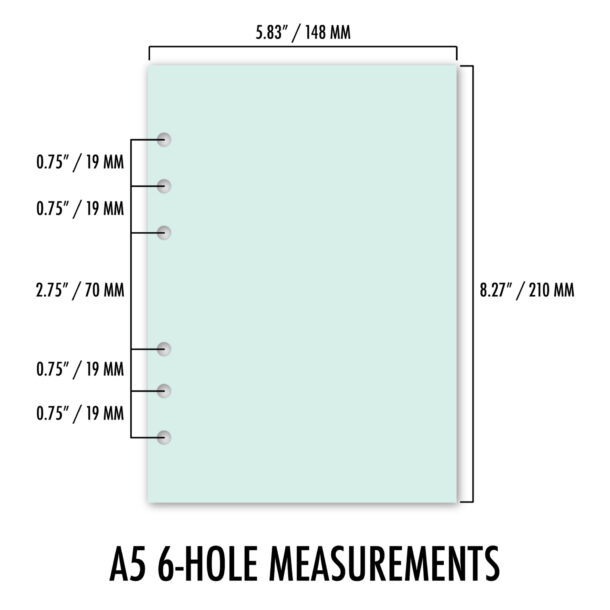
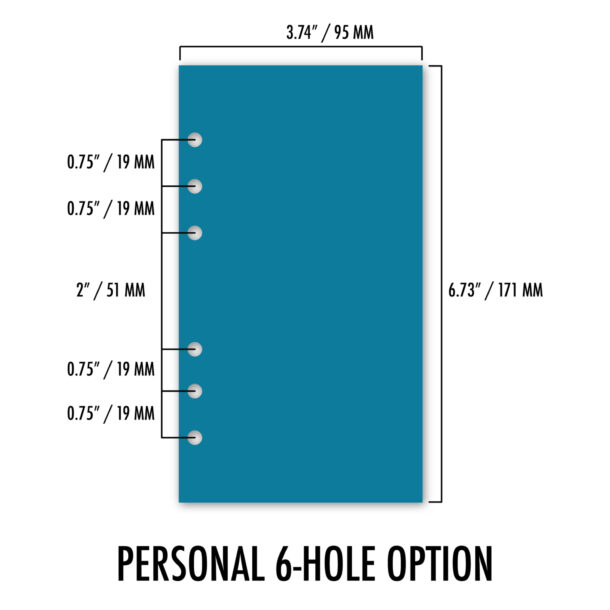
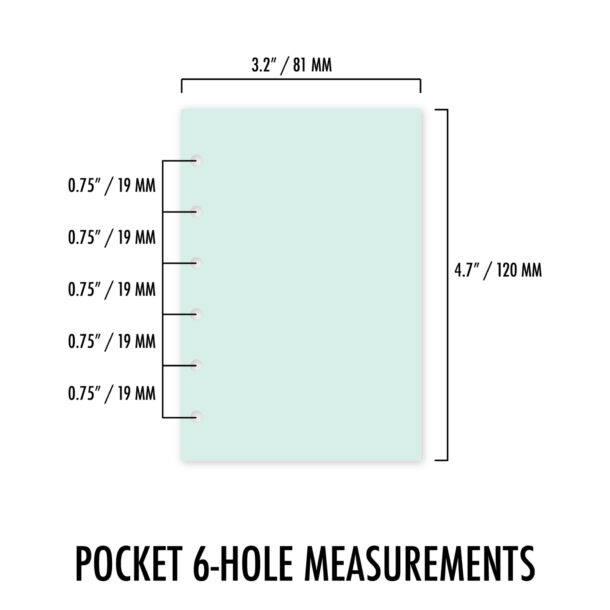
If you use a 6-hole ring binder, the spacing between those rings is what really matters. It tells us exactly what size your inserts need to be. That’s why we included this ring spacing chart (see below) showing gap measurements between the middle two rings.
Here’s how to measure your ring gap:
- Open your binder and find the two middle rings.
- Use a ruler to measure from the center of one hole to the center of the next.
- Match that number to the chart. Done.
Ring Gap Reference
| If your gap measures… | Insert Size |
|---|---|
| 2.75″ (70mm) | A5, A5 Slim |
| 2″ (51mm) | Personal, FC Compact, Personal Wide, and B6 (Personal supported) |
| 1.5″ (38mm) | A6 (reference only) |
| 0.75″ (19mm or “no” gap) | Pocket, Pocket XL |
A Note About Funky Sizes and Frankenplanners
- The paper is a custom cut (like 4.37″ × 6.75″ or some other non-standard measurements)
- But the ring mechanism is Personal size (2″ gap with .75″ spacing between ring clusters)
Some handmade or off-brand planners; especially those sold as “A6” or “custom”—don’t actually follow standard sizes. We’ve seen plenty where:
Even if the paper fits within the binder, the punch won’t line up with real A6 inserts. And if you’re trying to match our refills to those? They probably won’t work.
That’s why we recommend measuring both the paper and the ring gap before ordering. It’ll save you from frustration and from sending us that email we both don’t want to write.
Our Last Two Sizes: Half and HP Classic
Now that we’ve covered all the standard 6-ring options, let’s take a look at the final two sizes we offer: Half and HP Classic. These formats don’t use 6-hole rings—they each have their own binding style and quirks, and they deserve their own spotlight.
Whether you’re using a mini 3-ring binder from the Target Bullseye’s Playground or a full-blown disc system, here’s what you need to know to pick the right size.
Half Size
Also called: Half Letter, Junior
- Page size: 5.5″ × 8.5″
- Binding systems:
• 3-ring binders (like mini binders from Target or Staples)
• 7-ring binders (like Franklin Covey Classic, Day-Timer Desk, Day Runner Desk)
• 8-disc planners (like ARC Junior, Office Depot TUL Junior, Levenger Circa)
Half size is one of the most versatile formats we offer. It’s exactly half of a standard letter page and plays well with multiple binding systems. A 7-hole punched page works just fine in a 3-ring binder—those holes align with the top, middle, and bottom rings. If you’re using a disc-bound system, just make sure you’re using a Junior-size notebook with 8 discs.
Note: People sometimes confuse Half with Pocket due to photos where the ring gap isn’t obvious. But the actual paper size is very different, and the ring punch patterns are not the same.
HP Classic Size
Also called: Happy Planner Classic Size, HP Classic
- Page size: 7″ × 9.25″
- Binding system:
• 9-disc planners only
HP Classic size is exclusive to disc-bound systems and is most commonly associated with the Happy Planner Classic lineup. You’ll also find compatible accessories from inkWELL Press, various Etsy sellers, and other disc planner brands that cater to this format. If your planner uses 9 discs and your pages measure 7 × 9.25 inches, you’re in the right place.
Note: Classic size is not Half size and will not fit in standard 3-ring or 7-ring binders. It’s larger than Half, and only works with disc-bound systems that support 9-disc pages. Inserts designed for Classic size will not fit Letter size planners and vice versa due to differences in dimensions and punch configurations.
• Need More Help?
Head back to our Planner Refills section to browse inserts by layout. Every listing includes size options and punch style in the dropdown menus.
Need more guidance? Check out our FAQ page for more information. Just don’t skip this page and then panic-order the wrong size.